Organize Your Lens: The ICE Photography Planner Canva Templates
Running a photography business often feels like a constant race against the clock. Between the creative work of capturing images and the administrative grind of emails, invoicing, and marketing, it is easy to feel overwhelmed. Many photographers struggle to find a cohesive system that bridges the gap between their artistic vision and business reality. The Photography Planner Canva Templates |ICE collection is designed specifically to close that gap. It is not just a set of pages; it is a comprehensive operational hub built to streamline your workflow, allowing you to focus more on the lens and less on the logistics.
The "Ice Cream Shop" Aesthetic: More Than Just a Color Palette
When we talk about design assets, functionality is paramount, but visual appeal drives engagement. The Photography Planner Canva Templates |ICE features a unique "Ice Cream Shop" design and color palette. This isn't just a random collection of pastels; it represents a specific design philosophy. The palette is soft, approachable, and modern, utilizing a mix of gentle pastels and crisp neutrals that evoke a sense of calm and organization. This aesthetic choice is strategic. For a photographer, whose work is inherently visual, having a planner that looks cluttered or chaotic adds to mental stress. The ICE collection uses clean lines and ample white space—principles of modern typography and layout—to create a breathing room for your schedule.
The visual personality of these templates is professional yet warm. It avoids the sterile, corporate look of generic business planners. Instead, it offers a creative font pairing approach that balances readability with style. Whether you are a wedding photographer, a family portrait specialist, or a product photographer, the "Ice Cream Shop" theme provides a neutral yet stylish backdrop that does not compete with your brand imagery but rather complements it. It signals to the user that business management can be a pleasant, organized experience rather than a chaotic chore.
Comprehensive Systems for Real-World Workflow
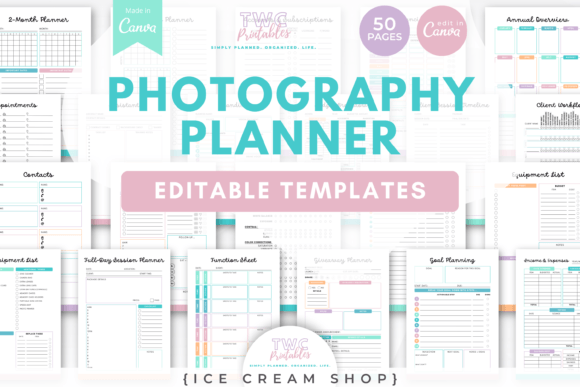
The true value of the Photography Planner Canva Templates |ICE lies in its depth. With 50 distinct templates, it covers every conceivable aspect of a photography business. This is not a generic planner with a few photography stickers thrown in; it is a specialized brand identity tool for operational efficiency.
Consider the client workflow. The collection includes specific sheets for client timelines, session planning, and contact management. This ensures that from the moment a lead comes in to the final delivery of images, every step is documented. For mini-sessions, which are high-volume and high-stress, having a dedicated Mini-session planner and Mini-session schedule is invaluable. It allows you to map out the day minute-by-minute, ensuring no client feels rushed and no detail is missed.
Furthermore, the templates address the "boring" but critical side of the business: finances. The inclusion of Income & expenses sheets and Budget breakdowns means you can track your cash flow without needing to learn complex accounting software immediately. It is a practical, tactile way to stay on top of your numbers. Similarly, the Equipment lists and Location scouting sheets help you prepare for shoots with military precision. You can log your gear, track maintenance, and document potential shoot locations all within the same visual ecosystem.
Strategic Marketing and Content Planning
In today’s digital landscape, a photographer is also a content creator and marketer. The Photography Planner Canva Templates |ICE acknowledges this reality by including robust marketing tools. The Marketing workflow template helps you plan your promotional activities, ensuring you are consistently visible to your audience.
For those who rely heavily on social media, having a plan is half the battle. While these are planner templates rather than social media graphics, they serve as the blueprint for your content strategy. You can plan out your posts, track your editing progress, and ensure your branding remains consistent across platforms. The Editing workflow sheet is particularly useful here; by batching your editing tasks, you can maintain a consistent visual style—your brand identity—across all your galleries and online portfolios.
The templates are designed in A4 and US Letter sizes, making them versatile for both digital use on tablets (using apps like GoodNotes) and traditional print. This flexibility is crucial for the modern creative who might sketch out a timeline on a tablet during a meeting but prefers a printed checklist on the day of the shoot.
Customization: Making the Templates Your Own
One of the standout features of this collection is that it is built for Canva. This democratizes design. You do not need to be an expert in Adobe InDesign or understand complex typesetting to make these planners look professional. Canva’s drag-and-drop interface allows for easy customization.
You can easily adjust the "Ice Cream Shop" color palette to match your specific logo design and brand colors. If your brand is moody and dark, you can shift the pastels to deep charcoals and burgundies. If your brand is bright and airy, the default palette might be perfect. You can also swap out the font pairings. The templates likely use a mix of sans serif fonts for clean body text and perhaps a display font or script font for headers. Changing these to your brand’s specific typeface ensures that every piece of paper that leaves your studio reinforces your brand recognition.
This level of customization turns a generic planner into a bespoke business tool. It helps in establishing visual hierarchy within your own notes—using bold headers for client names and lighter weights for details—making your planning process faster and more intuitive.
Practical Guidance for Implementation
Investing in the Photography Planner Canva Templates |ICE is the first step, but implementing them effectively is the key to success. Here is how to get the most out of this collection:
- Start with the Annual Overview: Before diving into daily tasks, map out your year. Mark your peak seasons, holidays, and personal time off. This gives you a "bird's eye view" of your availability.
- Standardize Your Client Process: Use the Client workflow sheet to create a standard operating procedure (SOP). Whether you are shooting a wedding or a headshot, having a checklist ensures you never miss a step, such as sending the contract or the final gallery link.
- Batch Your Admin Tasks: Use the Weekly planner to block out specific times for admin work. For example, dedicate Friday mornings to finances using the Budget breakdown template, and Monday mornings to marketing using the Marketing workflow.
- Review and Adjust: Business needs change. A workflow that works for a solo photographer might not work once you hire an assistant. Revisit your Contacts and Workflow sheets quarterly to ensure they still serve your current business model.
The Photography Planner Canva Templates |ICE is more than just a download; it is an investment in the infrastructure of your business. By providing a clear, aesthetically pleasing framework for everything from mini-session scheduling to equipment tracking