Perpetual Calendar Templates: Your Go-To ANY YEAR Design Asset
If you've ever scrambled to find a calendar layout for a niche project or an off-year schedule, you know the frustration of digital limitations. Most pre-made calendar assets lock you into specific years, forcing you to discard beautiful designs simply because the dates don't align with your timeline. This is where the practical utility of Perpetual Calendar Templates shines. Designed to function for ANY YEAR, this collection isn't just a set of dates; it is a robust system for visualizing time. Whether you are a designer creating a custom planner for a client, a small business owner scheduling a marketing campaign, or a crafter making a sentimental gift, the ability to reuse these assets indefinitely saves time, money, and creative energy.
The Anatomy of a Truly Flexible Calendar System
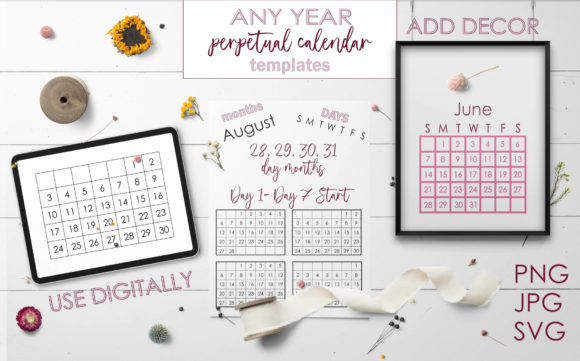
What sets this collection apart from standard calendar templates is the engineering behind the grid structure. Instead of providing static months, this set includes 28 distinct calendar variations based on the day the month starts (Day 1 through Day 7) and the total number of days in the month (28, 29, 30, and 31). This mathematical approach ensures that no matter what year you are working in—past, present, or future—you have the exact grid layout required.
The versatility is immediately apparent in the file formats provided. You receive JPEGs for quick placement, transparent PNGs that allow you to layer the calendar over complex backgrounds and textures without awkward white boxes, and SVGs for infinite scaling and editing. The SVG format is particularly valuable for professional designers working on large-format print or those who need to adjust line weights and colors to match a specific brand identity. The inclusion of blank templates in 4, 5, and 6-week configurations further enhances this utility, giving you a clean slate to apply your own typography and style.
Aesthetic Flexibility: The Sans Serif Foundation
Visually, this version of the Perpetual Calendar Templates adopts a simple sans serif style. This is a deliberate and strategic design choice. In modern typography, sans serif typefaces are prized for their legibility, neutrality, and ability to pair well with other fonts. The clean lines of this calendar do not compete for attention; they serve as a structural foundation.
The "personality" of these templates is functional, modern, and unobtrusive. It avoids the decorative flair of a script font or the heavy authority of a traditional serif font. Instead, it offers the visual equivalent of a well-organized workspace. This makes the calendar templates an ideal starting point for projects where the imagery or the surrounding content needs to take center stage. It provides the structure without imposing a rigid mood, allowing the user to steer the design toward corporate professionalism, minimalist chic, or casual utility.
Strategic Applications for Professionals and Creatives
The real value of a premium font or template system lies in how it integrates into your workflow. For graphic designers and publishers, these templates solve the recurring headache of editorial design. Imagine creating a "Year in Review" blog post or a future planning guide; you can generate accurate calendars for any year mentioned in the text without hunting for new assets.
For entrepreneurs and marketers, the applications are equally broad. Consider the following scenarios where these templates become essential design assets:
- Content Marketing: Create downloadable PDFs for your audience, such as "Social Media Content Calendars" or "Seasonal Planning Guides." You can offer these as evergreen lead magnets because the templates work for any year.
- Print on Demand: If you sell planners, wall art, or desk accessories, you can use the SVG files to create custom layouts. The transparency of the PNGs allows you to place the dates over photography or illustrations seamlessly.
- Brand Identity Systems: For agencies building a brand identity, providing a client with a branded calendar is a standard deliverable. These templates allow you to maintain the brand's typography standards while ensuring the dates are always accurate.
- Web Design and UI: When building a booking interface or a project management dashboard, having a scalable SVG calendar grid ensures that the UI remains crisp on retina displays and responsive across devices.
Optimizing Hierarchy and Readability
When working with calendar designs, visual hierarchy is critical. The user needs to be able to scan the dates quickly. The sans serif style included in this package supports this by offering high legibility at small sizes. However, the true power of these calendar templates lies in the separation of elements.
You are provided with the day headers (both Monday and Sunday starts) and the individual day numbers as separate components. This allows for advanced layout control. You might choose to use a bold, condensed display font for the month headers while keeping the actual dates in a clean sans serif for readability. This interplay between a creative font for headlines and a functional font for data is a hallmark of professional editorial design and web design.
Furthermore, the availability of 4, 5, and 6-week grids acknowledges a physical reality of calendar design: not every month fits neatly into a standard square grid without whitespace. By having these variations, you prevent the awkward stretching or squishing of dates that can ruin the rhythm of a layout.
Practical Guidance for Implementation
To get the most out of these templates, approach them as modular tools rather than static images. Here is a practical workflow for integrating them into your projects:
- Evaluate the Grid Requirement: Before starting, check the specific month you are designing for. Identify if it starts on a Monday or Sunday (depending on your regional preference) and how many days it contains. Select the corresponding template variation.
- Choose Your Format: If you are working in Adobe Illustrator or Affinity Designer, the SVG is your best bet for total control. If you are working in Canva or Photoshop and need to layer over a photo, the transparent PNG is the most efficient choice.
- Customize the Typography: Don't just accept the default sans serif if it doesn't fit your brand. Use the blank templates to overlay your own brand fonts. Ensure your chosen font has good spacing (kerning) so the numbers don't look crowded in the grid boxes.
- Check Contrast and Hierarchy: Ensure there is enough contrast between the background and the text. If you are placing the transparent PNG over a busy background, consider adding a slight drop shadow or a semi-transparent overlay behind the text to ensure the dates remain legible.
Ultimately, the goal of using Perpetual Calendar Templates is to streamline your creative process. By removing the variable of "finding the right year," you free up mental bandwidth to focus on aesthetics, branding, and user experience. Whether you are crafting a packaging design for a seasonal product or setting up a social media graphics